The Scheme of work nightmare
Jonathan Constantine · 2026-06-02T20:55:02.258+00:00
So we’re coming into the summer.
Depending on your contract, that either means you’re onto annualised hours and actively trying not to think about teaching for the next three months, or it means it’s time to start prepping for the next academic year—tweaking the modules you’ve just delivered and planning the new ones.
Which usually means starting with a scheme of work.
In all honesty, back when I was doing my PGCE, I didn’t fully understand the point of them. I used to think: just go in and teach, what could possibly go wrong? Years later (and with plenty of hindsight),I get it. When they’re done well, a scheme of work is a fantastic framework. It’s not meant to be a rigid, "gold standard" script that you can never deviate from, but it acts as a genuine guide to help you break down key topics and build a strong learning arc across the semester.
The problem is they can take hours to do properly and time will disappearing during this process.
You end up sitting there with a massive, messy module specification document open on one half of your screen, and a blank Word doc or Excel spreadsheet on the other. Your job is to somehow turn that giant block of text into a cohesive, week-by-week plan.
Without a doubt, it’s one of the most tedious administrative aspects of higher education.
You have to map out the learning outcomes, figure out how to chunk the theory so you don't overwhelm the class by week three, and invent creative active-learning ideas for every single session. By the time you get to week seven, your brain is usually fried. You stop being creative and just start copying and pasting generic phrases like "class discussion" or "group work" into the boxes just to get the thing finished.
You aren't teaching anymore; you're just trying to survive the spreadsheet.
This is exactly why I built the scheme of work generator inside Pedagogo.
During the summer last year, we ran the alpha version of the app within my own department. We were staring down the barrel of a massive workload, but using the tool meant our team was actually outputting twice as much material as the other teams in the exact same timeframe.
We’re heading into this summer facing a similar mountain—a number of brand-new modules that we have to deliver that have literally never been taught before. There’s no old material to copy. We’re starting from scratch. And I’ll be leaning on the tool heavily to get us through it again.
I didn’t want to build something that required you to learn how to write complex, multi-paragraph AI prompts just to get a basic plan. If you have to spend an hour tweaking a prompt to get what you need, the tech hasn't actually saved you any time.
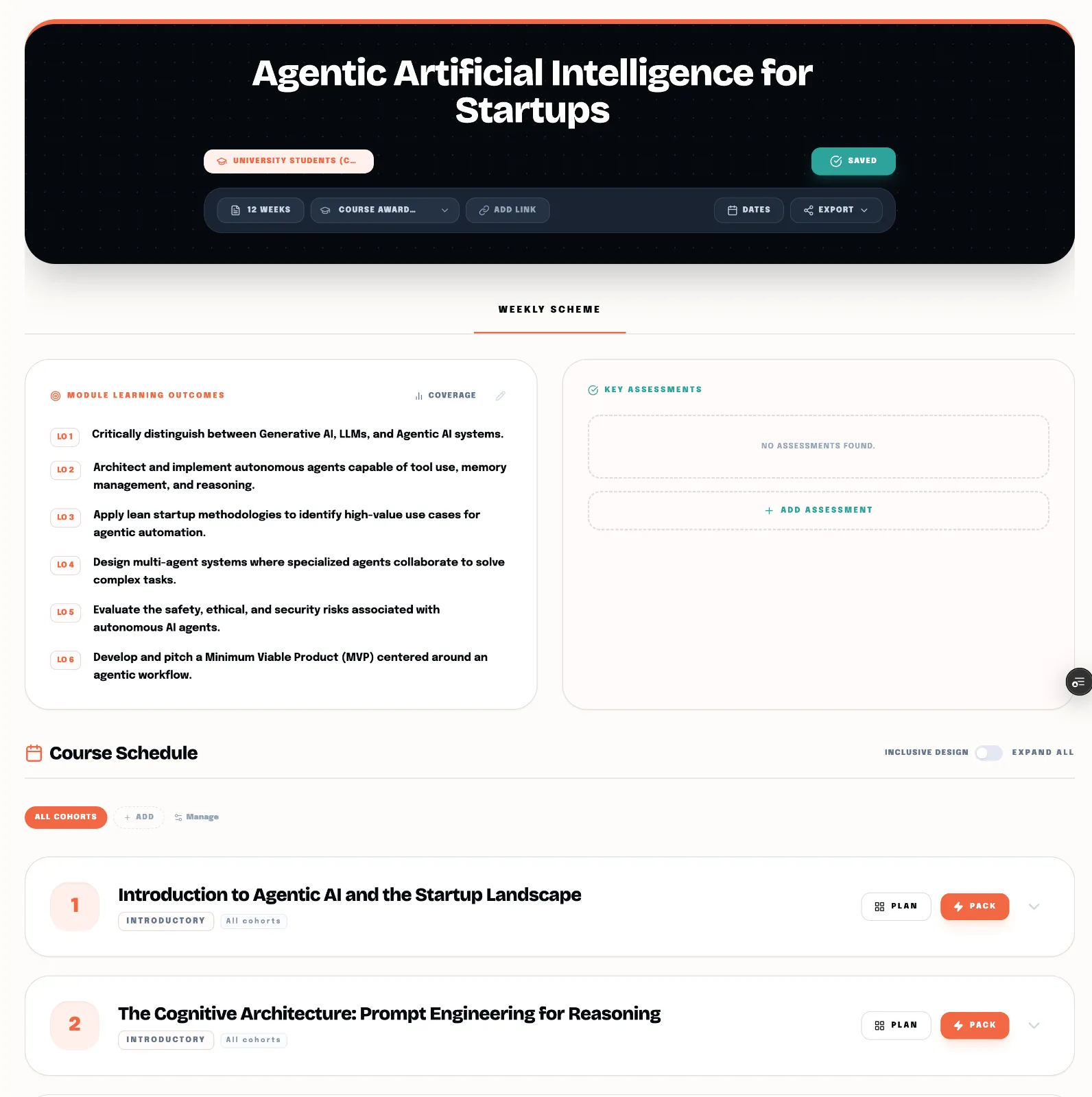
With Pedagogo, you just upload your module specs, set the number of weeks the classes run for, and Ped handles the rest. He reads the requirements and builds out a structured plan with specific, higher-ed-validated activity ideas for every week.
Because Ped actually understands academic context (unlike standard AI, which might suggest a childish icebreaker or a totally irrelevant industry reference), the suggestions actually make sense for degree-level students. He knows the difference between a high-level research seminar and an introductory lecture.
It gives you a solid, 80% finished foundation in about thirty seconds. From there, you just log in, tweak the bits you want to change, and you're good to go.
But during testing, I realised there was a second frustration: manually copying and pasting those weeks and units into Canvas or whatever LMS platform your institution uses. It's a click-heavy, soul-destroying task.
So I fixed that, too. If you use Canvas, you can link your account to Pedagogo via a Canvas-generated token. Ped can then post each week's structure, learning outcomes, and pre/post activities directly into Canvas for you, including a scheme of work at the top of the page. This feature alone saved me hours of admin during testing. (And if your uni uses a different LMS, we run an .IMSCC import cartridge to do the exact same thing, I'm working on Google Classroom at the moment).
You don't need to spend four hours of your weekend fighting with a spreadsheet or clicking around an LMS, even if you’re building a brand-new module from scratch. Let Ped do the formatting and the initial brainstorming, so you can just do the quick edits, close your laptop, and actually enjoy your evening.
If you've got a module you're dreading mapping out for the coming term, drop the module specs into Pedagogo and see how much time it saves you.